


If you haven't yet, follow us on X (Twitter), Mastodon, or Bluesky to know when we post new articles, and join our Reddit or Subscribe to us on YouTube to check out our content and interact with our awesome community. Thank you for supporting us!
Cairn is one of the big reasons this year has started off so strongly in regard to games. It's a fantastic climbing simulator, where we will go up a huge mountain, controlling one limb at a time, to make our way up. It's a great experience, and one I loved playing through, but performance on the Steam Deck is not great. It's a big issue, especially further up the mountain or when looking at the mountain from a wide angle. However, it seems as though this problem won't plague us for much longer.

In an update posted yesterday, Cairn's developers, The Game Bakers, addressed the performance issues on the Steam Deck, noting that they have been seeing the comments and outcry from players. They mention that they are working on a patch to improve performance further, and it's great to see them on top of it.
They also provided a temporary workaround to improve performance for the time being while they work on a permanent patch. To improve the Steam Deck's experience for right now, you can use this launch option in Cairn's Steam game properties:
-force-vulkanIn the early parts of the mountain climb, we do see some pretty nice improvements across the board. At the low settings with 1280x800 resolution, we can see a 5-10 FPS improvement depending on what you are looking at. The big framerate improvement I am most happy to see is when looking at the entire mountain, which in some cases went from the mid-30s to the low-40s.
However, this doesn't solve performance for the entire game. In the later sections of the game, especially towards the top, the framerate will drop to around 30 FPS and lower. The snowy effects can be pretty overwhelming for the Deck, and while there are some improvements here and there, it won't be able to handle over 30 FPS throughout the whole game.
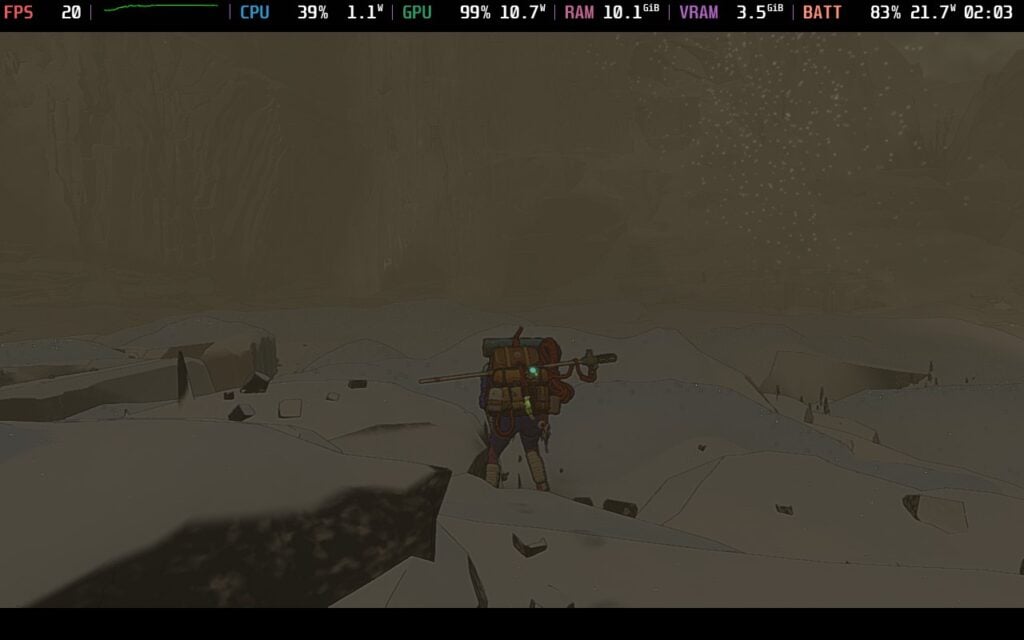
I would also still recommend playing the game on the low settings. Medium with the launch option is going to a little worse than the default experience on low, and the visual tradeoff, while noticeable, isn't worth the performance drop. So, keeping it on low with the default 1280x800 resolution is going to be best.
Still, it's obvious to see the improvements, and The Game Bakers deserves praise for it, though I do hope they will be able to make it better throughout the entirety of the game. I love Cairn, so seeing improvements is going to make me extremely happy. It still won't be fully improved throughout the whole game, so I wouldn't change the settings too much, but it's nice to see any improvement at all.
Cairn is on sale for $26.99 until February 12th and is rated Verified.
If you enjoyed this article, check out the rest of the content on SteamDeckHQ! We have a wide variety of game reviews and news that will help your gaming experience. Whether you're looking for news, tips and tutorials, game settings and reviews, or just want to stay up-to-date on the latest trends, we've got you covered!

RECENT NEWS
Categories
Accessories
Anbernic
Android
ASUS ROG Ally
ROG Xbox Ally
Classics on Deck
Community
Cryobyte33
Deals
Deck Mods
Emulation
Events
Featured Post
Game News
Game News
General Game News
HandheldHQ
Hardware
Lenovo
Linux
MagicX
Nintendo
ONE-NETBOOK
Opinion
Other Reviews
Accessory Reviews
Handheld Reviews
PlayStation
Proton
Retro Handhelds
Anbernic
AYANEO
AYN
GPD
MagicX
MANGMI
Retroid
TrimUI
SDHQ
Steam
Steam Machine
SteamOS
The Unsupported Report
Uncategorized
Uncategorized
Recent Tips & GUIDES
recent reviews





Regardless of Vulkan,my oled still struggles to hit 30 fps consistently. My impression is that Vulkan has made it worse. Running on low settings, Vsync off, native resolution. If you decide to lower the resolution it fixes some drops,but at the cost of very low fidelity graphics and jagged edges. At this point im considering playing this game strictly on my pc. It would have been a blessing to play this gem on the deck.
How odd. I definitely had better performance, but still not enough to recommend above 30 FPS. It still needs work though, but it sounds like the devs know about it and care.
What about forcing DX12 instead of Vulkan?
My deck has been hitting 18fps whether there's a lot of water nearby. Glad there's improvements coming.
Thanks for the detailed comparisons!
Bummer overall. I will be skipping this due to poor performance.