If you haven't yet, follow us on X (Twitter), Mastodon, or Bluesky to know when we post new articles, and join our Reddit or Subscribe to us on YouTube to check out our content and interact with our awesome community. Thank you for supporting us!
There are many ways to configure games to increase performance on the Steam Deck, and one of those is frame generation. Frame Generation is a tool that can artificially double the framerate of your game by creating fake frames to make it appear smoother. The most common frame generation we see on the Steam Deck is FSR Frame Gen, but it has a lot of issues when trying to use it. However, we also have Lossless Scaling, which not only runs better usually, but feels smoother with less noticeable input lag. It isn't perfect, but it's an improvement.
The Lossless Scaling program, which is available on Steam, doesn't support Linux/SteamOS, but with the help of PancakeTAS, a Linux version was created, and to make it easier to use, xXJSONDeruloXx created the lsfg-vk plugin to easily get it running on the Steam Deck. Unfortunately, the only way to get this plugin was to download and install it manually, which is a little bit of a chore, but that will no longer be necessary since the plugin is officially available on the Decky Plugin store.
If you don't have Decky Plugins installed, you can find out how to get it set up through our guide.
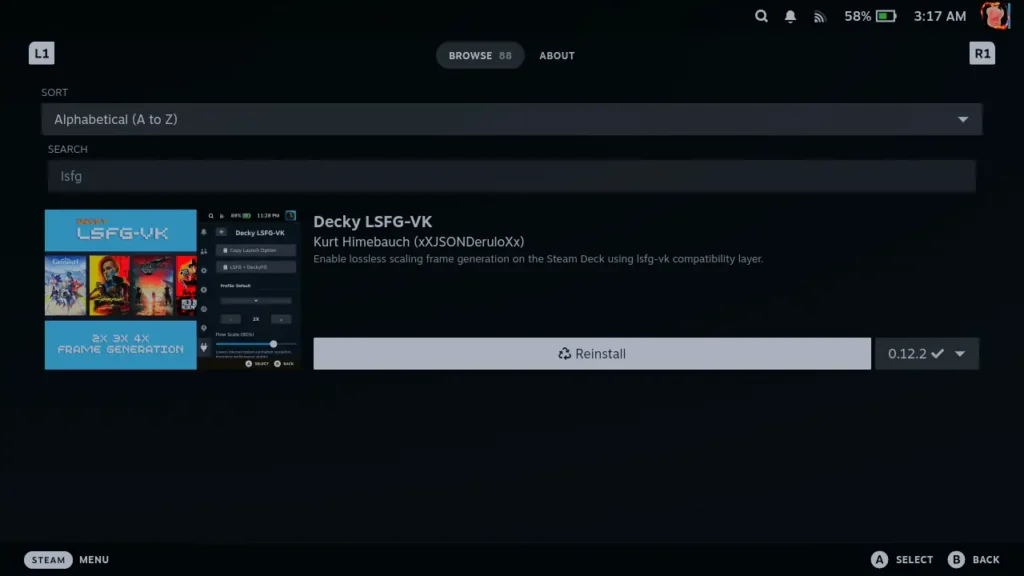
Basically, all you have to do now is go to the Decky Plugin store and search for "Decky LSFG-VK", and the plugin should now pop up. From there, it's as easy as installing and using it. It's quite easy to use as well. We will need a purchased copy of Lossless Scaling from Steam, but after that, just install it and lsfg-vk (which you can do from the plugin), and then copy the launch option from the plugin and put it onto the games you want to. Then, once you are in-game, head to the plugin and change the settings you want to. And if you did everything right, you should see framerate go "up."
This is extremely easy to do, especially compared to how it was before, but even with Lossless Scaling being better than FSR Frame Gen, it does have some issues. It isn't actually boosting your framerate, merely artificially increasing it, which means it needs a high base framerate to boost. If that base framerate goes down, performance will tank, and there will be major stuttering. We have seen this happen in Dying Light: The Beast and other very taxing games on the Deck, so keep that in mind when using it. There may also be some input lag, which is unavoidable, but it isn't as horrible as using FSR Frame Gen.

While this isn't a magical fix for performance and can come with some issues, it's nice to see it being easier to use and configure to try out for ourselves. I have, and always will be, a fan of choice and freedom to customize. So, having a tool like this be even more readily available is just a treat. While I tend to avoid using it for most games since I feel the input lag most of the time, I do recommend checking it out, especially now that it is so easy to download and install.
If you enjoyed this article, check out the rest of the content on SteamDeckHQ! We have a wide variety of game reviews and news that will help your gaming experience. Whether you're looking for news, tips and tutorials, game settings and reviews, or just want to stay up-to-date on the latest trends, we've got you covered!

RECENT NEWS
Categories
Accessories
Anbernic
Android
ASUS ROG Ally
ROG Xbox Ally
Classics on Deck
Community
Cryobyte33
Deals
Deck Mods
Emulation
Events
Featured Post
Game News
Game News
General Game News
HandheldHQ
Hardware
Lenovo
Linux
MagicX
Nintendo
ONE-NETBOOK
Opinion
Other Reviews
Accessory Reviews
Handheld Reviews
PlayStation
Proton
Retro Handhelds
Anbernic
AYANEO
AYN
GPD
MagicX
MANGMI
Retroid
TrimUI
SDHQ
Steam
Steam Machine
SteamOS
The Unsupported Report
Uncategorized
Uncategorized
Recent Tips & GUIDES
recent reviews